Wednesday, October 22, 2014

How to enable Instant Hotspot on an iPhone 5 or newer

Instant Hotspot is a new feature in iOS 8.1. It works by eliminating the need to manually enable Personal Hotspot on an iPhone 5.  Previously when we want to use an iPhone 5 to share its mobile Internet with other devices, we will need to enable it manually, and enter password to connect to it.  But now, that step is no longer needed for some iOS devices to connect to an iPhone 5.  For other non-iOS devices to connect to the iPhone 5 Personal Hotspot, the manual step will still need to be performed.

How to enable Instant Hotspot:
1. Log on to iCloud (in Settings -> iCloud) in your supported iOS devices with the same Apple ID as your iPhone 5's
2. If Bluetooth on the iPhone 5 has not been enabled, enable it in Settings -> Bluetooth
2. Also enable Bluetooth radio of your iOS devices

* You do NOT need to enable the setting in Settings -> Personal Hotspot on an iPhone 5
* Bluetooth radio is required for the devices to find each other in close proximity

How to connect to an Instant Hotspot:
1. On a supported iOS device, go to Settings -> Wi-Fi
2. Wait for the iPhone 5 to show up in the list under Personal Hotspots
3. Connect to it

Instant Hotspot works on a Mac too.  But you need some later models of the computer to use this feature.  Not all iOS devices are supported too.  For the full list of supported devices, visit http://support.apple.com/kb/TS5458

Keep in mind that the Mac must be running OS X Yosemite, while the iOS devices must be running iOS 8.1.

Unfortunately, my MacBook Air - a mid 2011 model - is not supported :(

Tuesday, June 10, 2014

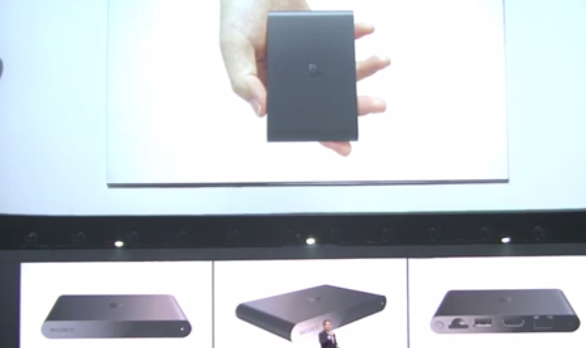
Sony PlayStation TV will be launched in the US, Canada, and Europe this year.

During E3 2014 earlier, Sony said that the PlayStation TV will be launched in the US, Canada, and Europe this year.  I think he said Fall, and it will support the PlayStation Now game streaming service.  Now I'm not certain if this is the same as the PS VIta TV that was announced in Tokyo Game Show last year, and it has already been launched in many parts of Asia.

While the PS Vita TV is white in color, this PlayStation TV is in grayish, metallic color, although the dimension and shape look exactly like the PS Vita TV.  It will cost US$99 just for the unit, or a US$199 that includes a DualShock3 controller (DS4 would be better I think), an 8GB memory card, a download code for a Lego game, and an HDMI cable.


I have a PS Vita TV at home.  Honestly I find not so much use on it yet - all I can play on it is a Mahjong PSP game for now - with that 1GB internal memory.  While you can download the YouTube for PS Vita app, it refuses to run on a PS Vita TV.  The only app it runs is TuneIn Radio.


Friday, July 12, 2013

The right ASUS RT-N56U settings for AirPlay?

This article is on firmware version 3.0.0.4.360 and first published on 12/Jul/2013.

I have been having problem with Apple AirPlay feature especially with Apple TV when I have source devices connected to the 5 GHz band of the RT-N56U.

The problem is less severe on my MacBook Air than what I have experienced on an iPhone and an iPad.  What'd happened is that the source devices will not discover AirPlay destination devices on the network.  This means they cannot stream multimedia data to the AirPlay devices.

The fix I usually do is to disconnect these source devices from the 5 GHz band and connect them to the 2.4 GHz band, or reconnect to the same 5 GHz band.  The AirPlay devices then automatically show up.  The 2.4 GHz band is slightly more stable than the 5 GHz band, although both will disappear eventually (perhaps a night or 2 later).

I read somewhere that AirPlay devices are using the Multicast feature to broadcast their presence.  I'm not sure if this is causing incompatibility with the router but I'm just guessing that this ASUS 'advanced' router may be trying to save energy by disconnecting/disabling/filtering some network traffic.

Now I would like to fix it permanently.  What I have done is setting these in the Wireless - Professional page (firmware version 3.0.0.4.360):
  • Enable wireless scheduler - No (default was "Yes") - I don't think this is causing the problem but just want to disable it regardless
  • Enable IGMP Snooping - Enable (default was "Disable") - edit: 4/Oct/2013 - this seems to be the only setting that matters
  • WMM DLS - Enable (default was "Disable") - edit 04/Oct/2013 - it seems that this setting is irrelevant

I have these set about 3 days ago.  So far it's been stable.  I hope this will last.

Update on 11-Aug-2013: I can see that my AirPlay devices are definitely staying visible more permanently.  I think perhaps in 1 occasion during past couple of weeks I upgraded the firmware on the RT-N56U, Apple TV disappeared on a 2.4 GHz band - My Apple TV is permanently on the 5 GHz band - I just apply the same settings mentioned above on the 2.4 GHz and restarted the router.  It's been working well since.

Update on 13-Nov-2018:  If you want to help me financially, even if it's just a little, I thank you!

Tuesday, February 26, 2013

Windows Azure - my first more detailed look into it

I have got some time to look at the cloud services provided by Microsoft - the Windows Azure services. Seriously this name actually gives me an impression that it is some kind of video games. Probably because it reminds me of an old RPG game called 'Curse of the Azure Bonds'. Maybe some know it is based on the Dungeons & Dragons universe. I even have a story book on that.

Anyway the Windows Azure provides something-as-a-service (SaaS), anything-as-a-service (AaaS), ...the as-a-service concept.  It has virtual platform services, mobile services, database services, web sites, just to name a few.  Individual developers will like these.  It gives them access to wide range of expensive infrastructure services to perform some proof-of-concepts application developments.  Oh I should mention that it gives a 90-day free-trial for anyone who signs up.

I have to try that out one day...


Saturday, October 27, 2012

Apple AirPlay is incredible in my home

Here's the setup.

I have
- An Apple TV, connecting to an HDTV.
- A Macbook Air running OS X Mountain Lion - I need Mountain Lion for AirPlay feature
- An iPad 2.  It is kind of a family device used by all the members of the family, although any iOS devices are designed and meant to be used by a single user

Not too many Apple products alright - just enough for now.  But I think an iPod touch or iPhone will definitely complements this setup nicely.

Then I also have
- A Synology NAS in the setup.  The features on this thing is incredible.  I configure it to provide WebDAV, FTP, VPN, and other cool stuff that I will talk about next time.
- A notebook PC running Windows 7.  This runs iTunes and catalogs the NAS media files, and sharing the iTunes library out using the HomeShare feature.

All of these devices are connected to a LAN network in the same subnet.


So these are what I do with the Apple TV:

  • View movie streaming on it or browse the files on NAS via iTunes
  • Browse the previews of movies and songs - maybe I will buy some of them
  • Browse some of the news channels (WSJ Live)
  • With an iPAD, I can use the Remote Control app to control and type on the Apple TV.  This is when a smaller device such as the iPod touch or an iPhone is more convient for this job


But the primary feature I use Apple TV for is its AirPlay feature.

  • While working on the Macbook Air, I play video from any players, iTunes, or whatever, I can instantly hit the AirPlay icon and stream the screen AND audio to the Apple TV.  Viola, a bigger-screen display to share with others in my house
  • I can use the iPad to do the same thing on most of the applications.  However, the picture sometimes does not fill the entire TV area and I have yet to find out why
  • I can use the iPad to stream music to Apple TV via AirPlay too - so the iPad can access the iTunes library, play the music and stream the audio to Apple TV.  Or the APple TV can also access the iTunes library and play the music directly.  But for me, it's easier to search and play music on the Macbook or the iPad.


This works pretty well for me.  Now let me think how I can expand this setup for an even better experience.

Saturday, September 29, 2012

Troubleshooting Apple TV - network subnet

Not too long ago, I have been having a strange problem with my Apple TV.  The problem was not the device itself, but it's the connection to it from my iPad and Macbook Air.   Sometimes AirPlay didn't work when the computers did not detect Apple TV even though it was on, and on the same LAN subnet.  What I did was to switch off and on the WIFI radio on the computers to find ATV again.

I figured it might have been problem with the UDP broadcast that did not reach my computers.  Before I purchased my ATV, I have been running with the 192.168.0.0/25 network.  This means the broadcast address is 192.168.0.127.  Thinking along this line, I verified that all devices have been set with subnet mask of 255.255.255.128 - on the computers, the network access storage server, Apple TV, router settings.  All seemed OK but the problem still persisted.

Believing the broadcast message still didn't reach all my computers, I decided to configure the subnet mask to 255.255.255.0, CIDR 192.168.0.0/24.   So starting with setting my router's LAN IP address, its DHCP server, and setting the router LAN IP address as one of the DNS servers in the DHCP configuration.  Then I renewed the IP address on all the devices, starting with my NAS storage (this is using fixed IP actually), ATV, and finally the client devices.

I have been running in this setup a couple of days now.  This seems to have solve the problem.  Now my devices can find the ATV all the time, and AirPlay-ed all my music and video to TV.

Anyway, I will still need to monitor this for a long period before I can call this a 'problem solved!'

Monday, November 21, 2011

A tour in S2 Heights, Seremban 2, Negeri Sembilan

Some of the (almost) completed houses built in S2 Heights, Seremban 2.  This is one of the 24x75" Serena houses.

Serena, S2 Heights, Seremban 2