Thursday, March 15, 2018

e-Filling BE Tax form submission Year of Assessment 2017 (YA) - LHDN Malaysia

This is a quick note on selective information on submitting YA 2017 BE, for individual without business income, specifically on e-Filling BE.  This is not a complete guide.

Scroll down this article to find where these HK-2 worksheets (Helai Kerja) are.

------------
Note that I'm not a tax agent so this is only a general advice from an individual who files his taxes every year since he started working.
------------

- Calculating your income (Pendapatan)
Add up all your income for your EA 2017 form issued by your employer.

Usually, the amount in the JUMLAH at the end of section C can be used, however, be sure that if you have an amount in item 6. Pampasan kerana kehilangan pekerjaan, you should deduct the RM10,000 for your every year of service with the company.  This amount is the loss of employment (aka retrencement) compensation.

As an example, if you receive RM60,000 as the amount in item 6., and your year of service with the company is 4 years and 10 months, you deduct RM10,000 x 4 = RM40,000 from that JUMLAH total.

Fill up the final figure into the field name "Pendapatan berkanun penggajian" in the e-filling BE form.

EA Form 2017


- Exemption on "Lifestyle"This is new in YA 2017, "Gaya hidup-Perbelanjaan untuk diri sendiri, suami/isteri, anak".  And it allows up to RM2,500 exemption on spending on books, magazines, sports equipment, computers, smart phones, tablet computers, and home broadband subscriptions.

By introducing the above, individual exemption per category (e.g. books category, computer category, etc.) in previous YA was removed.

- Baby feeding equipment for mother
Pembelian peralatan penyusuan ibu untuk kegunaan diri sendiri anak berumur 2 tahun dan ke bawah

If you have spend money in feeding equipment for your own baby under 2 years old, you can put up to RM1,000 in this field

- Fees for kindergarden or pre-school for children 6 years and younger
Finally there's this "Yuran penghantaran anak 6 tahun dan ke bawah ke taman asuhan bagi kanak-kanak / tadika yang berdaftar" which I'm not entire sure if it's new for YA 2017.  But this means you can also get tax-exemption for up to RM1,000 that you have spent for your chid(children)


Lastly I list some links of guides that you can download from LHDN

- Form download (choose BM or English)

Download LHDN Forms (http://www.hasil.gov.my/bt_goindex.php?bt_jborang=1&bt_tahunbor=2017&bt_kump=2&bt_skum=3&bt_posi=1&Submit=Cari)

In case you are looking for those HK forms (e.g. HK-2, HK-6, ..) you can download the B/BE Guidebook 2015.  All the worksheets (Helai Kerja HK-2, HK-6, HK-xx) are in there.  Strangely there are no 2017 Guidebooks.


That's it for now.   Thanks for reading.


Tuesday, September 20, 2016

Windows 10 Anniversary upgrade experience on my Dell XPS 8900

Recently I have a Dell machine XPS8900 upgraded to Windows 10 Anniversary edition.  But it was not all smooth without some issues, of course.

In May 2016, I cloned its original Windows 10 disk onto an SSD drive.  I had the system booted up the first time from the SSD and it worked flawlessly for a couple of months.

The SSD is on SATA 0.  The original Windows 10 HDD remains as a 2nd hard disk, connected to SATA 1.  I have another 2 disks installed in the system and together, these 3 HDDs are configured into a RAID 5 array.  No formatting of the original Windows 10 HDD as I want to preserve all its content.

Then when Windows 10 Anniversary update came along for an update, the update failed.

After some hours of troubleshooting, the root cause was that I had 2 EFI System Partitions on the system, one on the SSd, and the other was on the original Windows 10 HDD.  This confused Windows 10 update but it wouldn't tell you straight that it didn't like it.

And so, Windows update failed and gave an error stating some SAFE_BOOT stuff.  Unfortunately I didn't capture a screenshot, otherwise it will be most useful.

Now, the solution is simple: change the other partition ID.

EFI System Partition has this unique GUID as its identifier.
c12a7328-f81f-11d2-ba4b-00a0c93ec93b


I ran a program called diskpart.exe from the command prompt, as an administrator.  While in the program, SELECT the disk that represents my 2nd HDD (an RAID 5 array).  LIST its PARTITION. SELECT the EFI partition by referencing its number, and issue a command "uniqueID disk" to show its current identifier.

The identifier ID shown matched the above.

The same command can also be used to change its UNIQUE ID:
uniqueID disk ID=c12a7328-f81f-11d2-ba4b-00a0c93ec930

The only difference is the last character.  I changed it to a 0.

Exit DiskPart and retried the Windows 10 Update. It worked.

Monday, January 04, 2016

Happy New Year 2016

Yes, it's another year.  It's my first day of work.  This is the year to 'git gud' at what I have learned.  Also, it's time to steer clear of the vast ocean aimlessly.

Wednesday, January 21, 2015

It's now a new year, I want to learn something new in computer language.

What is it going to be?  At this time, I think it will be Swift, JavaScript, CSS, and HTML5.  I knew C++, a little of VB, and a lot of vbscript - which I picked up way back in 2000.  But I should have gone for JavaScript at that time.  Oh well, it was a choice for my work.

Now it is time to start again.  Refresh myself, refresh my purpose.

Wednesday, October 22, 2014

How to enable Instant Hotspot on an iPhone 5 or newer

Instant Hotspot is a new feature in iOS 8.1. It works by eliminating the need to manually enable Personal Hotspot on an iPhone 5.  Previously when we want to use an iPhone 5 to share its mobile Internet with other devices, we will need to enable it manually, and enter password to connect to it.  But now, that step is no longer needed for some iOS devices to connect to an iPhone 5.  For other non-iOS devices to connect to the iPhone 5 Personal Hotspot, the manual step will still need to be performed.

How to enable Instant Hotspot:
1. Log on to iCloud (in Settings -> iCloud) in your supported iOS devices with the same Apple ID as your iPhone 5's
2. If Bluetooth on the iPhone 5 has not been enabled, enable it in Settings -> Bluetooth
2. Also enable Bluetooth radio of your iOS devices

* You do NOT need to enable the setting in Settings -> Personal Hotspot on an iPhone 5
* Bluetooth radio is required for the devices to find each other in close proximity

How to connect to an Instant Hotspot:
1. On a supported iOS device, go to Settings -> Wi-Fi
2. Wait for the iPhone 5 to show up in the list under Personal Hotspots
3. Connect to it

Instant Hotspot works on a Mac too.  But you need some later models of the computer to use this feature.  Not all iOS devices are supported too.  For the full list of supported devices, visit http://support.apple.com/kb/TS5458

Keep in mind that the Mac must be running OS X Yosemite, while the iOS devices must be running iOS 8.1.

Unfortunately, my MacBook Air - a mid 2011 model - is not supported :(

Tuesday, June 10, 2014

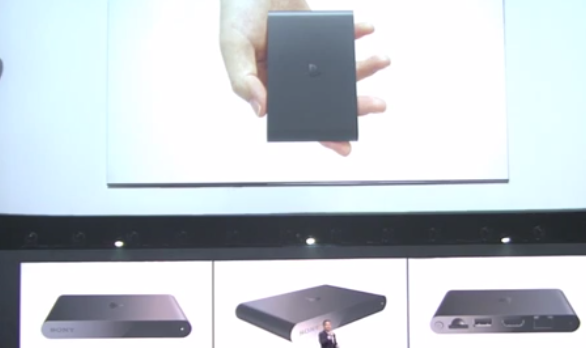
Sony PlayStation TV will be launched in the US, Canada, and Europe this year.

During E3 2014 earlier, Sony said that the PlayStation TV will be launched in the US, Canada, and Europe this year.  I think he said Fall, and it will support the PlayStation Now game streaming service.  Now I'm not certain if this is the same as the PS VIta TV that was announced in Tokyo Game Show last year, and it has already been launched in many parts of Asia.

While the PS Vita TV is white in color, this PlayStation TV is in grayish, metallic color, although the dimension and shape look exactly like the PS Vita TV.  It will cost US$99 just for the unit, or a US$199 that includes a DualShock3 controller (DS4 would be better I think), an 8GB memory card, a download code for a Lego game, and an HDMI cable.


I have a PS Vita TV at home.  Honestly I find not so much use on it yet - all I can play on it is a Mahjong PSP game for now - with that 1GB internal memory.  While you can download the YouTube for PS Vita app, it refuses to run on a PS Vita TV.  The only app it runs is TuneIn Radio.


Friday, July 12, 2013

The right ASUS RT-N56U settings for AirPlay?

This article is on firmware version 3.0.0.4.360 and first published on 12/Jul/2013.

I have been having problem with Apple AirPlay feature especially with Apple TV when I have source devices connected to the 5 GHz band of the RT-N56U.

The problem is less severe on my MacBook Air than what I have experienced on an iPhone and an iPad.  What'd happened is that the source devices will not discover AirPlay destination devices on the network.  This means they cannot stream multimedia data to the AirPlay devices.

The fix I usually do is to disconnect these source devices from the 5 GHz band and connect them to the 2.4 GHz band, or reconnect to the same 5 GHz band.  The AirPlay devices then automatically show up.  The 2.4 GHz band is slightly more stable than the 5 GHz band, although both will disappear eventually (perhaps a night or 2 later).

I read somewhere that AirPlay devices are using the Multicast feature to broadcast their presence.  I'm not sure if this is causing incompatibility with the router but I'm just guessing that this ASUS 'advanced' router may be trying to save energy by disconnecting/disabling/filtering some network traffic.

Now I would like to fix it permanently.  What I have done is setting these in the Wireless - Professional page (firmware version 3.0.0.4.360):
  • Enable wireless scheduler - No (default was "Yes") - I don't think this is causing the problem but just want to disable it regardless
  • Enable IGMP Snooping - Enable (default was "Disable") - edit: 4/Oct/2013 - this seems to be the only setting that matters
  • WMM DLS - Enable (default was "Disable") - edit 04/Oct/2013 - it seems that this setting is irrelevant

I have these set about 3 days ago.  So far it's been stable.  I hope this will last.

Update on 11-Aug-2013: I can see that my AirPlay devices are definitely staying visible more permanently.  I think perhaps in 1 occasion during past couple of weeks I upgraded the firmware on the RT-N56U, Apple TV disappeared on a 2.4 GHz band - My Apple TV is permanently on the 5 GHz band - I just apply the same settings mentioned above on the 2.4 GHz and restarted the router.  It's been working well since.

Update on 13-Nov-2018:  If you want to help me financially, even if it's just a little, I thank you!

Tuesday, February 26, 2013

Windows Azure - my first more detailed look into it

I have got some time to look at the cloud services provided by Microsoft - the Windows Azure services. Seriously this name actually gives me an impression that it is some kind of video games. Probably because it reminds me of an old RPG game called 'Curse of the Azure Bonds'. Maybe some know it is based on the Dungeons & Dragons universe. I even have a story book on that.

Anyway the Windows Azure provides something-as-a-service (SaaS), anything-as-a-service (AaaS), ...the as-a-service concept.  It has virtual platform services, mobile services, database services, web sites, just to name a few.  Individual developers will like these.  It gives them access to wide range of expensive infrastructure services to perform some proof-of-concepts application developments.  Oh I should mention that it gives a 90-day free-trial for anyone who signs up.

I have to try that out one day...


Saturday, October 27, 2012

Apple AirPlay is incredible in my home

Here's the setup.

I have
- An Apple TV, connecting to an HDTV.
- A Macbook Air running OS X Mountain Lion - I need Mountain Lion for AirPlay feature
- An iPad 2.  It is kind of a family device used by all the members of the family, although any iOS devices are designed and meant to be used by a single user

Not too many Apple products alright - just enough for now.  But I think an iPod touch or iPhone will definitely complements this setup nicely.

Then I also have
- A Synology NAS in the setup.  The features on this thing is incredible.  I configure it to provide WebDAV, FTP, VPN, and other cool stuff that I will talk about next time.
- A notebook PC running Windows 7.  This runs iTunes and catalogs the NAS media files, and sharing the iTunes library out using the HomeShare feature.

All of these devices are connected to a LAN network in the same subnet.


So these are what I do with the Apple TV:

  • View movie streaming on it or browse the files on NAS via iTunes
  • Browse the previews of movies and songs - maybe I will buy some of them
  • Browse some of the news channels (WSJ Live)
  • With an iPAD, I can use the Remote Control app to control and type on the Apple TV.  This is when a smaller device such as the iPod touch or an iPhone is more convient for this job


But the primary feature I use Apple TV for is its AirPlay feature.

  • While working on the Macbook Air, I play video from any players, iTunes, or whatever, I can instantly hit the AirPlay icon and stream the screen AND audio to the Apple TV.  Viola, a bigger-screen display to share with others in my house
  • I can use the iPad to do the same thing on most of the applications.  However, the picture sometimes does not fill the entire TV area and I have yet to find out why
  • I can use the iPad to stream music to Apple TV via AirPlay too - so the iPad can access the iTunes library, play the music and stream the audio to Apple TV.  Or the APple TV can also access the iTunes library and play the music directly.  But for me, it's easier to search and play music on the Macbook or the iPad.


This works pretty well for me.  Now let me think how I can expand this setup for an even better experience.

Saturday, September 29, 2012

Troubleshooting Apple TV - network subnet

Not too long ago, I have been having a strange problem with my Apple TV.  The problem was not the device itself, but it's the connection to it from my iPad and Macbook Air.   Sometimes AirPlay didn't work when the computers did not detect Apple TV even though it was on, and on the same LAN subnet.  What I did was to switch off and on the WIFI radio on the computers to find ATV again.

I figured it might have been problem with the UDP broadcast that did not reach my computers.  Before I purchased my ATV, I have been running with the 192.168.0.0/25 network.  This means the broadcast address is 192.168.0.127.  Thinking along this line, I verified that all devices have been set with subnet mask of 255.255.255.128 - on the computers, the network access storage server, Apple TV, router settings.  All seemed OK but the problem still persisted.

Believing the broadcast message still didn't reach all my computers, I decided to configure the subnet mask to 255.255.255.0, CIDR 192.168.0.0/24.   So starting with setting my router's LAN IP address, its DHCP server, and setting the router LAN IP address as one of the DNS servers in the DHCP configuration.  Then I renewed the IP address on all the devices, starting with my NAS storage (this is using fixed IP actually), ATV, and finally the client devices.

I have been running in this setup a couple of days now.  This seems to have solve the problem.  Now my devices can find the ATV all the time, and AirPlay-ed all my music and video to TV.

Anyway, I will still need to monitor this for a long period before I can call this a 'problem solved!'

Monday, November 21, 2011

A tour in S2 Heights, Seremban 2, Negeri Sembilan

Some of the (almost) completed houses built in S2 Heights, Seremban 2.  This is one of the 24x75" Serena houses.

Serena, S2 Heights, Seremban 2

Sunday, October 02, 2011

MacBook Air 13" 2011 photo shots


I have gotten this new MacBook Air 13" (year 2011) since early August and didn't take any photos of it until today.  Here I'm taking these photos for your viewing pleasure.

Oktoberfest mug 2011


I've just got myself an 'Oktoberfest' mug that comes with a purchase of 2 x 6-pack.  This cost me about RM60.

Cheers (prost!) people!


By the way...OktoberFest is mostly celebrated in September, in Munich, Germany


http://en.wikipedia.org/wiki/Oktoberfest

Saturday, August 13, 2011

What started the fan on my 13" MacBook Air 2011?

Here I am, have got myself a new 2011 Apple MacBook Air.  I like it.  The build is solid; the weight is just nice for me; the thin case is easy to carry with just one hand.  And it's so quick to close the lid and re-open it to continue whatever work I have been doing.  The battery also lasts about 4 to 5 hours based on my usage.


But with this, I still could not leave without certain features that I miss from Windows.  First of all, Microsoft Money.  This is the only piece of software ever that I have most often used in the past, err, 10 years?  Microsoft no longer develops this software but they have included a "sunset" edition for free to users of all the earlier versions.  The next one is a ActiveX, which runs only in Internet Explorer.  ActiveX is used on a couple of websites that I use almost every day and there are no other web browsers that support ActiveX.  Lastly, the Encrypted Files System, EFS, in Windows 7 that I use on my USB flash drive to store some personal files.  I find no solution in Mac OS X Lion that lets me use a certificate-based EFS on the flash drive.


Wait, I'm supposed to stick to the topic of what started my MacBook Air fan.  The MacBook Air runs so quietly most of the time except when the fan starts to run at full speed.  I can feel the warm breeze from the left side of the system, near the power connector.  I figure these may be the reasons the fan start.  You see, the sole reason a fan starts is to reduce the temperature of certain components in the system when a thermal sensor measures that its temperature reaches a certain level.  I guess it's mainly the CPU that runs the hottest when it's stressed to perform to 100%.   Back to the possible reasons that trigger the fan in my case:


1) VMware Fusion - this virtualization software runs my Windows 7 Operating Systems so that I can run Microsoft Money and IE.   I notice that whenever I started this, surely a couple of minutes later, the fan started into full spin.  Even though I have only assigned 1GB of memory to it.  I think I will try to put this OS on a diet by disabling some services


2) Adobe Flash Play - occasionally I play some Flash games.  This also kick-starts the fan.  I vaguely remember Steve Jobs complaining how Flash Player behaves badly.  Oh well.  Hopefully this HTML5/Adobe Edge may supersede Adobe Flash and behave better


Seems to me that the fan noise also affects many others who stated their comments in the Apple Support forum https://discussions.apple.com/thread/3194717?start=0&tstart=0


18-Aug-2011 I found one article by VMware.  Not all of the things are applicable when we use Windows 7 in a MacBook.  View that article at VMware View Optimization Guide for Windows 7.   By doing some of the suggestions, I am able to reduce the idle memory usage of Windows 7 Professional to about 320MB.  The general idea is that whatever things the HOST/VMware Fusion will do, we disable the similar functions available in the guest OS - i.e. Windows 7.


03-Oct-2011 Using coconutBattery 2.7, I measured the "Battery power usage" to be about 24 watt when I was running a Flash game in Facebook, compared with just about 8 watt without it running


Wednesday, July 20, 2011

The HP TouchPad

The HP TouchPad has been launched in some countries.  It is currently running WebOS 3.0.  There may be updates to the OS by HP to fix certain issues with applications and user experience.


For now, some of HP TouchPad characteristics and features are listed below.  Skype voice and video call fucntionalities (HP Synergy) are integrated in the OS.  Video calling APIs are not available in the SDK  at this time.
  • Videos are played in landscape mode only
  • The TouchPad supports HTML5 and Flash video in full screen mode
  • WebOS does not support WMA, WMV, and AVI
  • The TouchPad supports H.264 Flash Video, MPEG4 Codecs (MP4, M4V, 3GP, 3G2, M4A, MP3, AAC, AMR, QCP)
  • Amazon Kindle for WebOS will be availble
  • QuickOffice - an office productivity tools - reads Microsoft WOrd, Excel, PowerPoint, PDF files.  It does not edit these documents
What set the HP TouchPad apart from the other tablet computers?
    1. Touch to Share (for easy data communications)
    2. Touchstone technology (for wireless power charging)
    3. Beats technology (for better audio experience)
    4. Compatible with HP Printing Solutions
    5. HP Synergy (for voice and video calls)
    6. Just Type (for better user experience)
    7. Support to Adobe Flash Player (for full web experience)


More updates will be posted when I have more information about this HP product.  HP has not announced the launch date for Malaysia at this time.


These are the technical specifications:


  • HP webOS 3.0
  • High-speed connectivity
  • Qualcomm Snapdragon dual-CPU APQ8060 1.2-GHz processor
  • 9.7-inch diagonal XGA capacitive, multitouch screen with a vibrant, 18-bit color, 1,024 x 768 resolution display
  • The option of either 16 GB or 32 GB of internal storage
  • High-performance browser with access to the web, including support for Adobe Flash Player Beta (10.3 Beta) for access to rich, Flash-based web content
  • Wireless connectivity:
    • Wi-Fi 802.11b/g/n with WPA, WPA2, WEP, 802.1X authentication
    • A-GPS (3G only)
    • Bluetooth wireless technology 2.1 + EDR with A2DP stereo Bluetooth support
  • Multimedia options, including music, photos, video playback, and a 3.5 mm headset/headphone/microphone jack
    • Internal stereo speakers and Beats Audio
    • Front-facing 1.3-megapixel webcam for live video calling
  • Email, including EAS (for access to corporate Microsoft Exchange servers) and personal email support (Google Gmail push, Yahoo!, POP3, IMAP)
  • Robust messaging support
  • Light sensor, accelerometer, compass (magnetometer) and gyroscope
  • Rechargeable 6,300 mAh (typical) battery
  • Micro-USB (Charging and PC Connect) with USB 2.0 Hi-Speed
  • Built-in HP Touchstone technology for easy charging (HP Touchstone for TouchPad sold separately) and HP Touch to Share to share web addresses between TouchPad and compatible webOS phones
  • Dimensions: 190 mm x 242 mm x 13.7 mm (7.48 inches x 9.53 inches x .54 inches)
  • Weight: approximately 740 g (1.6 pounds)

Tuesday, December 21, 2010

Configuring ICA / RDP session timeout values using WMI VB script

Many times you may want to use a script to configure a Windows Server RDP or the Citrix ICA timeout values.  Although these can be achieved using a Group Policy Object (GPO) if your computers are in an Active Directory domain, you may choose to use a script such as this to set the timeout values in certain situations.  For example, before the computers are joined to a domain, or on computers running Terminal Services or Citrix that are not managed by a GPO.


Here I share the VBS codes to achieve this.  There are 3 timeout values you can set:


  1. Active Session Timeout
  2. Idle Session Timeout
  3. Disconnected Session Timeout


Active Session Timeout - this value determines when to disconnect the session from the user, while the session is still alive on a server, even if the user is actively working on the session


Idle Session Timeout - this value determines when to disconnect the session from the user if the user does not perform any activities (via keyboard and mouse) on the session


Disconnected Session Timeout - this value determines when a disconnected session - a session that is running on a server but are not presented to a user - will be terminated on a server


The lines of code below are not optimized.  I just did a quick-and-dirty approach to achieve what I want to do.  You will need to modify it to make it do what you want to set.


The functions will also check if the GPO has enforced the values.  This means it will not be able to set the value if so.  There are no detail comments on what the functions are.


If you have suggestions to make this better please feel free to leave comments.


This script can be run using cscript.exe.


'This script supports Windows XP/Server2003/Vista/Server 2008 only.  Windows 2000 is not supported
'
'Your should run this script with the //b parameter for running in auto-admin script to suppress console output
'
'This script can be duplicated for step-outs if required and just change the values of the timeout
'


Option Explicit
Dim ICAActiveSessionTimeout,ICAIdleSessionTimeout,ICADisconnectedSessionTimeout
Dim RDPActiveSessionTimeout,RDPIdleSessionTimeout,RDPDisconnectedSessionTimeout
Dim strOSversion,iResult
Dim objWMI_TS,strComputer


'==========================================================
' MAIN BODY STARTS
'==========================================================
ICAActiveSessionTimeout = 0                                     ' A 0 means never timeout
ICAIdleSessionTimeout = 1800000                                            ' 30 mins in milliseconds
ICADisconnectedSessionTimeout = 28800000      ' 8 hours in milliseconds


RDPActiveSessionTimeout = 0                                    ' Never
RDPIdleSessionTimeout = 600000                                             ' 10 mins in milliseconds
RDPDisconnectedSessionTimeout = 900000                         ' 15 mins in milliseconds


strComputer = "."    ' if a computer name can be specified here if you have remote administrative rights to it


strOSVersion = OSVersion()
WScript.echo "OS Version is: " & strOSVersion


If strComp(strOSVersion,"6.0",1) > 0 Then
' If this is Windows Server Vista/Server 2008


  WScript.Echo "This is a Vista/WS2K8 or newer"
  Set objWMI_TS = GetObject("winmgmts:" _
      & "{impersonationLevel=impersonate}!\\" & strComputer & "\root\cimv2\TerminalServices")
  iResult = ConfigureTSSessionWS2K8("ICA-tcp",ICAActiveSessionTimeout,ICAIdleSessionTimeout,ICADisconnectedSessionTimeout)
  iResult = ConfigureTSSessionWS2K8("RDP-Tcp",RDPActiveSessionTimeout,RDPIdleSessionTimeout,RDPDisconnectedSessionTimeout)
  iResult = ConfigureTSClientSettingWS2K8("RDP-Tcp")


Elseif strComp(strOSVersion,"5.2",1) >0 Then
' If this is XP/Server 2003


  WScript.Echo "This is an XP/Server 2003"
  Set objWMI_TS = GetObject("winmgmts:" _
      & "{impersonationLevel=impersonate}!\\" & strComputer & "\root\cimv2")
  iResult = ConfigureTSSession("ICA-tcp",ICAActiveSessionTimeout,ICAIdleSessionTimeout,ICADisconnectedSessionTimeout)
  iResult = ConfigureTSSession("RDP-Tcp",RDPActiveSessionTimeout,RDPIdleSessionTimeout,RDPDisconnectedSessionTimeout)


Else


  WScript.Echo "This operating system is not supported."
  WScript.Quit(0)


End If


WScript.Echo ""
WScript.Echo "Result of the action: "
DisplayTSSessionSetting


WScript.Quit(0)


'==========================================================
' MAIN BODY ENDS
'==========================================================


'-----------------------------------------------------
' FUNCTIONS AND SUBROUTINES
'-----------------------------------------------------


Function ConfigureTSClientSettingWS2K8(strTerminalName)
'
' This configures the Printer Mapping property
'
Dim colItems,objItem,errResult,objInstances,objInstance,iResult


  Set colItems = objWMI_TS.ExecQuery("Select * from Win32_TSClientSetting WHERE TerminalName='" & strTerminalName & "'")


  If NOT IsNull(colItems) Then
    For each objItem in colItems
      WScript.Echo ">Configuring Client Settings for " & objItem.TerminalName
      WScript.echo " Configuring Windows Printer Mapping"
      Wscript.Echo "  Current setting: " & objItem.WindowsPrinterMapping
      if objItem.PolicySourceWindowsPrinterMapping = 1 Then
        WScript.Echo "  Cannot change WindowsPrinterMapping because of enforced GPO"
      else
        iResult = objItem.SetClientProperty("WindowsPrinterMapping",1)
      End If
      objItem.Put_
      Wscript.Echo "  New setting: " & objItem.WindowsPrinterMapping
    Next
  End If


End Function


'-----------------------------------------------------
'
'This works on Windows Server 2008/Vista only
'
Function ConfigureTSSessionWS2K8(strTerminalName,ActiveSessionTimeout,IdleSessionTimeout,DisconnectedSessionTimeout)


Dim colItems,objItem,errResult


  Set colItems = objWMI_TS.ExecQuery("Select * from Win32_TSSessionSetting WHERE TerminalName='" & strTerminalName & "'")


  if NOT IsNull(colItems) Then
    For Each objItem in colItems
        WScript.echo ">Setting " & objItem.TerminalName


        If UCase(objItem.TerminalName) = UCase(strTerminalName) Then
           objItem.TimeLimitPolicy = 0
           objItem.put_


                   If objItem.PolicySourceActiveSessionLimit <> 1 Then
              errResult = objItem.TimeLimit("ActiveSessionLimit",ActiveSessionTimeout)
           Else
              WScript.Echo "Policy enforced.  Cannot set ActiveSessionLimit"
           End If


           If objItem.PolicySourceIdleSessionLimit <> 1 Then
              errResult = objItem.TimeLimit("IdleSessionLimit",IdleSessionTimeout)
           Else
              WScript.Echo "Policy enforced.  Cannot set IdleSessionLimit"
           End If


           If objItem.PolicySourceDisconnectedSessionLimit <> 1 Then
              errResult = objItem.TimeLimit("DisconnectedSessionLimit",DisconnectedSessionTimeout)
           Else
              WScript.Echo "Policy enforced.  Cannot set DisconnectedSessionLimit"
           End If


           objItem.refresh_
        End if
    Next
  End If


  ConfigureTSSessionWS2K8 = 0


End Function
'-----------------------------------------------------


'-----------------------------------------------------
'
'This function is for Windows XP/Server 2003 only
'
Function ConfigureTSSession(strTerminalName,ActiveSessionTimeout,IdleSessionTimeout,DisconnectedSessionTimeout)


Dim colItems,objItem,errResult


  On Error Resume Next


  Set colItems = objWMI_TS.ExecQuery("Select * from Win32_TSSessionSetting WHERE TerminalName='" & strTerminalName & "'")


  if NOT IsNull(colItems) Then
    For Each objItem in colItems
        WScript.echo ">Setting " & objItem.TerminalName


        If UCase(objItem.TerminalName) = UCase(strTerminalName) Then
           objItem.TimeLimitPolicy = 0
           objItem.put_


           errResult = objItem.TimeLimit("ActiveSessionLimit",ActiveSessionTimeout)
           errResult = objItem.TimeLimit("IdleSessionLimit",IdleSessionTimeout)
           errResult = objItem.TimeLimit("DisconnectedSessionLimit",DisconnectedSessionTimeout)
           objItem.refresh_
        End if
    Next
  End If


  ConfigureTSSession = 0


End Function


'-----------------------------------------------------


'-----------------------------------------------------
'
'Displays the session values
'
Sub DisplayTSSessionSetting


Dim objInstances,objInstance


  Set objInstances = objWMI_TS.InstancesOf("Win32_TSSessionSetting",48)


  For Each objInstance in objInstances
     WScript.Echo objInstance.getObjectText_
  Next
End Sub
'-----------------------------------------------------


'-----------------------------------------------------
'
'Query the OS version number
'
Function OSVersion()
Dim objOS
  OSVersion = 0
  On Error Resume Next


' Connect to WMI and obtain instances of Win32_OperatingSystem
  For Each objOS in GetObject("winmgmts:").InstancesOf ("Win32_OperatingSystem")


    OSVersion = objOS.Version


  Next


  if Err <> 0 Then
      WScript.Echo "ERROR in function OSVersion(): " & Err.Description
      Err.Clear
  End if
End Function
'-----------------------------------------------------

Monday, December 20, 2010

5 things I do not like about the Nissan Grand Livina (1.8L review)

The Nissan Grand Livina - a mini MPV that - according to Nissan Malaysia, "Drives like a sedan, fits like an MPV".  I agree that the car was easy to drive around, and the ride comfort is excellent.  Being seated in the car on the front passenger seat does not remind of my experience in a bigger MPV like the Toyota Innova, which was similar to being in a van as I could feel my seat sway left and right when travelling 90km/h on a straight line.


The Nissan Grand Livina


The Nissan Grand Livina


But the Grand Livina does have many things, mostly in the car interior, that I feel Nissan could have easily adjust to improve and make the cusomters happy. Here I list the 10 things I disklike about the Nissan Grand Livina.


1) The primitive audio System

The moment I sat in the car, I can immediately see the very dull-looking audio system.  The buttons are big but they only serve a single function at all time.  This Clarion does not play any MP3, WMA, or USB contents.  And it does not have any AUX input.  The speakers, however, are pretty nice with enough clarity to listen to.


Simple audio system with a single Audio CD player and radio (No MP3, No USB)


2) The noisy air-conditioning system

There are 4 speeds available on the air-conditioner.  The lowest speed is quiet, but I can hardly feel the wind even when seated on either the driver or the front passenger seat.  The middle aircond vents take some getting used to to adjust and you really need to fine-tune it carefully to direct the wind.  On a cool day, this level is sometimes nice.  On a hot day, at least a level 2 is needed to make the cabin more comfortable.  Level 2 gives you stronger wind, however, it also creates more noises in the cabin.  Level 3 or 4 shoud only be used for a short period when you just want to 'turbo' the fan in response to passengers complaints.

Oh and note that there are only 3 positions in the air cond flow paths on the knob (compared with 5 positions normally).

What, only 3 positiosn on the direction control?  Even a MyVi has 5.  Note that the windscreen vent is not available
That's right. No holes on the 'vent' under the windscreen

3) The irritating safety seat belt

I was so disappointed to realize that the seat belt on the front seats cannot be height-adjustable!  I think such design only exists in the 1980's, when I saw often during my taxi rides in an old Nissan Sunny.

So the problem with this is that the belt does make me feel very uncomfortable.  The belt rubs against my neck and shoulder too often during ride, causing irritating skin rashes.  I had to use a belt clip to loosen it but doing this will reduce the effectiveness of a safety belt.


Non-height adujustable seat belt!  This will be first in my not-to-buy checklist when shopping for cars in the future


4) Narrow opening angle of the back doors

Being an MPV, I think the back doors should open wider.  A wide-opening door (like what the MyVI has, or the new Honda City) not only gives enough space for people to move in/out quickly, but it also makes loading cargoes through the doors an easier feat.

This is as wide as it can open

5) Lack of convenient storages for the driver

The car has 1 glove box too deep for the driver, one covered storage (on a 1.8l model) under the cockpit, one door pocket, one small storage on the door which also serves as a door handle, one center storage placed with the hand brake.

Where are the cup holders?  They are combined with the covered storage under the cockpit.  If you have a water bottle, you lose your storage to store small notes, sunglasses, receipts, ...

The glove box is deep, and its door cover has a strange design where there are openings on both side where the hinges are.  Small items will drop off, or get in the way between the hinges to close the door.


The covered storage. Looks OK so far


A cup holder and an ashtray


The cup holder tray with the ashtray can be removed, which gives you more space.  But you'll lost cup holder on the front
The cup holder tray with the removable ashtray


Deep glove box.  Openings on the sides for items to fall off


The center storage where the hand brake is


Driver side door pocket and door handle/storage.  A Touch N Go Smart Tag will most likely be stored here


Door pocket on the back door.  Narrow - enough to fit small thin items only

Price of this car: RM 97,300 OTR
I have more to complain but I'll leave this for now.  Until next time.  Do drive safely!